Questions and answers · Your phone and screen time
How do I stop scrolling and start working out?
Flip the order: the workout first, the apps after. Willpower loses to a feed that is built to keep you there, so remove the choice. Lock the apps that eat your time until today's training is done. Then the workout becomes the way to your phone instead of the thing your phone crowds out.
Why a lock works better than a promise
A promise to "just check quickly" has to be kept at the exact moment you are at your weakest. A lock is decided in advance, by the person you are when you plan. It is the same principle as not keeping sweets at home.
Do this
- Pick the culprits. Two or three apps are enough. You know which ones.
- Decide what opens them. A whole workout, or today's ten push-ups.
- Start with weekdays. Add the weekend when it works.
Lock apps in MassBuilder
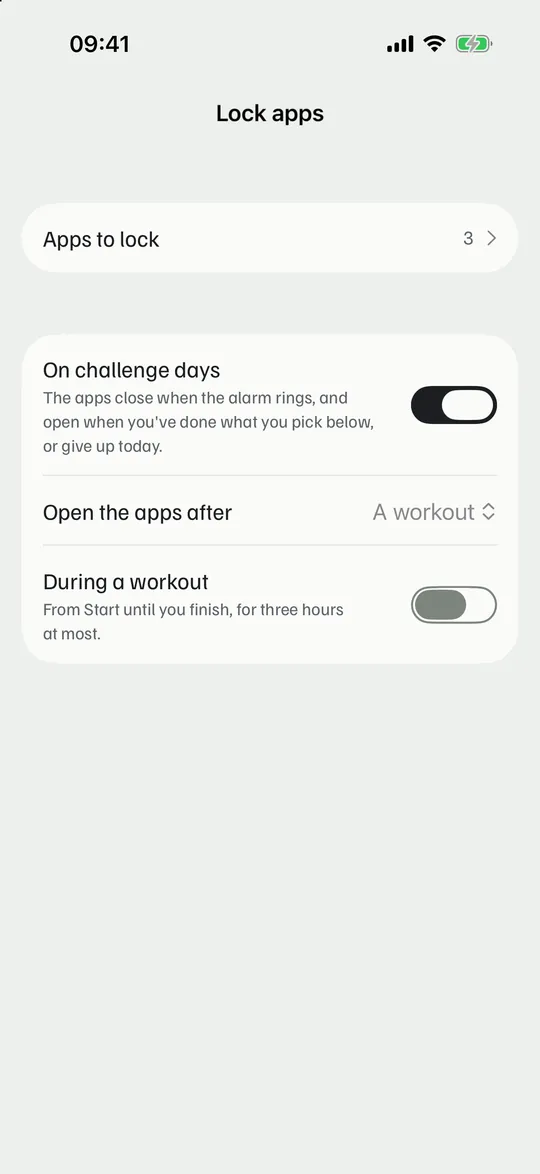
Under Supports you find Lock apps. You pick apps, categories or websites in Apple's own picker, and MassBuilder never learns which ones they are. On challenge days they close when the alarm rings. You decide what opens them: a workout, the challenge or a workout, or the day's active calories or a workout. While they are closed, the lock can't be changed. The ways out are to train or to give up for the day.
It's your phone, and you can always take the Screen Time permission back in Settings. The lock is there for the person you want to be. It is not a cage.
More questions on the same thing
- Is there an app that locks social media until I've worked out?
- Yes, several, and MassBuilder is one of them. There the apps are opened by a real workout or by the daily challenge, counted by the camera, in the same app that holds your training log.
- Can I cheat my way past the lock?
- You can always remove the permission in your phone's settings, and you can give up for the day in the app. But that takes an active decision, and that is the whole point.
- Does MassBuilder see which apps I lock?
- No. You pick them in Apple's picker, and the app only gets anonymous tokens that work on your device. The choice never leaves your phone.
- Can the apps be locked during the workout itself too?
- Yes. With During a workout the apps are closed from when the workout starts until it is finished, for three hours at most.
- What happens on a day without a challenge?
- Then the apps are open. The lock follows the challenge's weekdays and Pause mode.
- Are push-ups enough to open the apps?
- If you choose that. With The challenge or a workout, the apps open when the daily challenge is done. With A workout, it takes a whole workout: strength, a WOD or cardio.
This answer was written with Claude and checked against the app (version 4.0) and the sources. Found a mistake? Write to oskar.ege@icloud.com.